In this article
- What is the difference between the Meta Pixel and CAPI?
- Choose your implementation path first
- Is the Meta Conversions API free?
- Preserve fbc and fbp before the conversion happens
- How identity stitching helps
- Build the customer information payload
- Normalize before hashing
- Send a CAPI event from your server
- Deduplicate overlapping Pixel and CAPI events
- Verify delivery, matching, and attribution separately
- How TrueTracked connects the steps
- Keep available visit context
- Enrich a later purchase
- Send and check the event
- Is the Conversions API worth it?
- Sources
The Meta Conversions API (CAPI) sends conversion events from your server to Meta. Those events support measurement and ad optimization alongside the browser-based Meta Pixel.
A lead form can submit successfully while its browser event fails to arrive. A purchase webhook can reach your server with an email address but no trace of the earlier ad click. CAPI gives you a delivery path; your implementation decides which data travels through it.
That is where collection, identifier continuity, and verification matter. TrueTracked is an advertising attribution and conversion tracking platform that connects those steps. This guide explains the setup choices, the data to preserve, and the checks to run before relying on the results.
What is the difference between the Meta Pixel and CAPI?
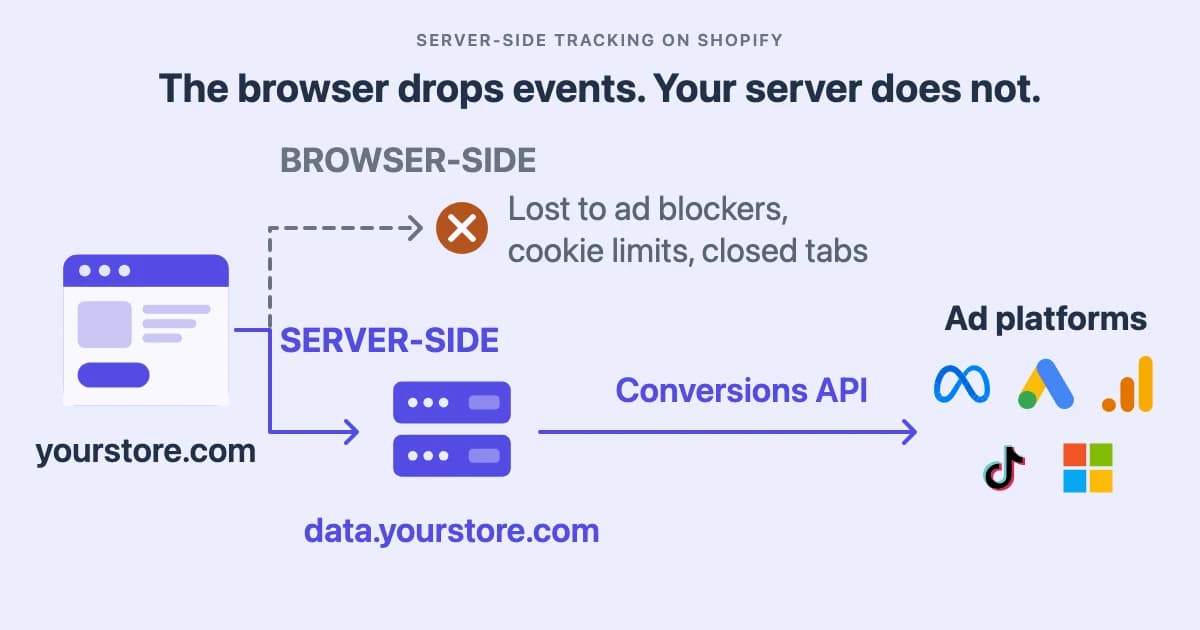
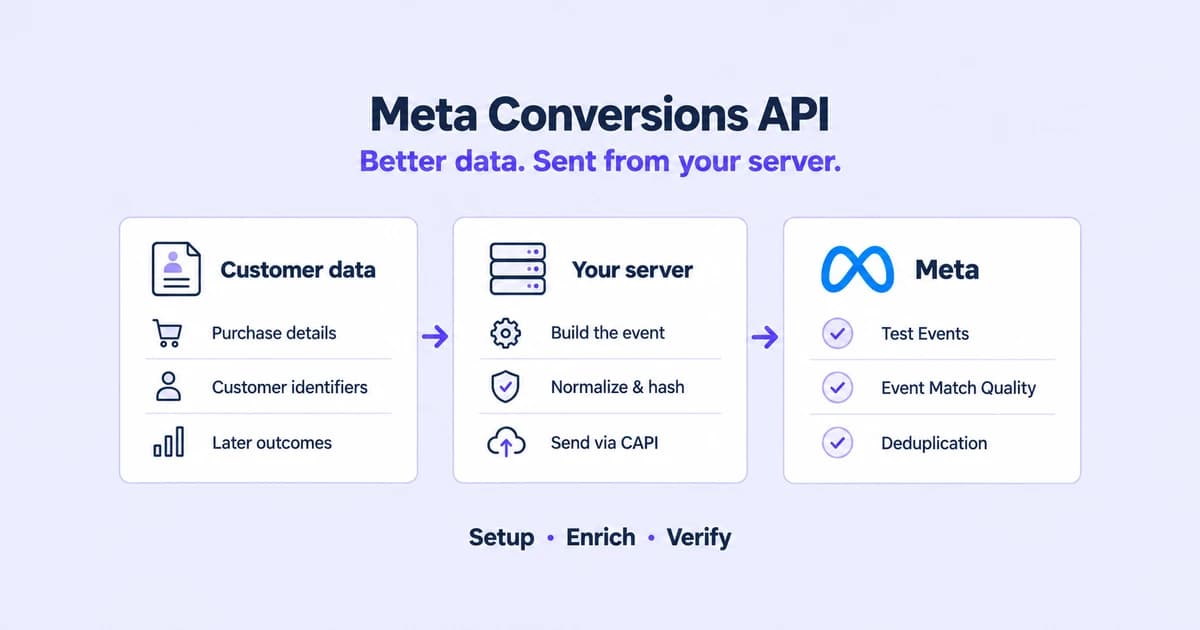
A server connection can help in three different ways. Meta's Conversions API documentation describes it as connecting marketing data from your server, website platform, mobile app or CRM to the systems that optimise targeting and measure outcomes.
Delivery coverage. A backend-recorded conversion can be sent even when the final browser request fails. For example, a booking confirmed by your application need not depend on the visitor keeping a confirmation page open.
Matching data. A server event can combine browser identifiers with customer information held in your business systems. An email address, phone number, or customer ID can supply context missing from the current browser event.
Later outcomes. Your store backend can record a subscription renewal, a manually entered order, or a payment confirmed after the original visit. An integration must explicitly capture and map that outcome before CAPI can report it.
| What changes | Meta Pixel | Conversions API |
|---|---|---|
| Delivery | Sends from the visitor's browser | Sends from a server or integration |
| Available data | Browser context and customer fields made available to the pixel | Data supplied by the source system and any enrichment process |
| Earlier visit context | Depends on available cookies and identifiers | Can include previously stored context when correctly linked |
| Later business outcomes | Needs a browser event to observe them | Can receive outcomes recorded later in your store backend |
| Dependencies | Browser scripts, collection permissions, and network requests | Source events, identifiers, configuration, and successful delivery |
The Pixel is not limited to four matching fields. Shopify's Meta integration documentation describes settings that also send customer information such as name, location, and email.
CAPI can still add value when it carries the same identifiers as a browser event that never arrived. Richer data and better delivery are separate improvements. The broader architecture is covered in server-side tracking.
Choose your implementation path first
Start with where the conversion is recorded and who will maintain the connection. A checkout completion, a payment webhook, and an order updated in your admin need different collection paths.
| Path | Useful when | What to verify |
|---|---|---|
| Direct backend integration | You control the store backend and need custom business events | Identifier capture, authentication, retries, event mapping, and monitoring |
| Platform integration | Your commerce platform already supports the events you need | Which events and customer fields it actually sends |
| Server-side Google Tag Manager | You use a tagging stack and want control over routing and transformations | Which clients receive source data, including any backend feeds |
| Managed tracking with TrueTracked | You want connected tracking, purchase enrichment, and Meta delivery | Installation, Meta configuration, event mappings, and overlapping senders |
| Conversions API Gateway | You prefer a gateway deployment to a custom API integration | Supported event sources, hosting responsibilities, and enrichment options |
A server-side container can receive data from different sources. Google's architecture guide explains how clients receive requests and make event data available to tags. Its capabilities depend on what you feed it.
With TrueTracked, start by installing tracking for your website or conversion source. Then connect Meta, select the pixel, review the event mapping, and test. The manual request later in this article is for readers building their own integration.
Is the Meta Conversions API free?
Meta does not charge a per-event CAPI fee. Your costs come from engineering, infrastructure, or a managed service, plus ongoing maintenance. Compare the work included, especially identifier capture and verification.
Preserve fbc and fbp before the conversion happens
The customer record and the ad visit often arrive through different systems. An order webhook might contain an email address and total, while the click identifier exists only in a previously recorded session.
The two Meta identifiers have different jobs:
fbccarries Meta click context. It comes from the_fbccookie or is constructed from an observedfbclidin the landing-page URL.fbpis a browser identifier, commonly stored in the_fbpcookie. Its presence does not itself establish that the visitor clicked a Meta ad.
The underscore belongs to the cookie name. The corresponding CAPI fields are fbc and fbp. Meta's parameter builder provides helpers for collecting and constructing these parameters.
Capture available identifiers when the visit happens and preserve their association with the session. Carry a stable customer or contact reference through forms, checkouts, and webhooks where the platform allows it.
When a later conversion arrives, use that association to retrieve relevant stored context. Do not invent an fbc value for a visitor whose Meta click was never captured. A newly generated browser ID also does not recover an old browsing history.
How identity stitching helps
Identity stitching, which is TrueTracked's name for this, connects records that would otherwise appear to belong to separate journeys. An identity graph is the set of relationships behind that process: sessions, customer references, and the signals that connect them.
An illustrative sequence shows where it helps. A visitor arrives through a Meta ad and submits a form with an email address. Three days later, a purchase record carries that same email but no browser cookies. The shared identifier can connect the purchase with the earlier session and its stored click context.
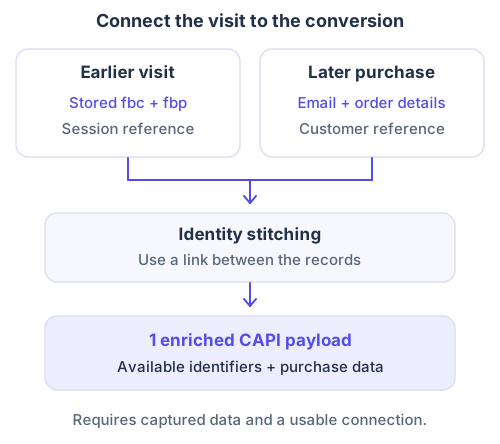
The later conversion can carry context captured during an earlier visit.
TrueTracked applies this in its purchase pipeline. It looks up linked session history and adds available _fbc and _fbp values alongside the order's customer data. It can also reuse previously stored, hashed customer fields for returning visitors.
That is enrichment of the server payload. Cookie persistence is a separate feature: with a verified custom tracking domain, TrueTracked can set and refresh valid Meta cookies through server response headers.
Identity links have limits. Explicit customer identifiers and inferred device or network relationships provide different levels of evidence. A linked journey should not be presented as guaranteed recognition of every person across every device.
Build the customer information payload
CAPI matching fields go in user_data. The right combination depends on what was actually collected for the visitor and conversion.
These are the thirteen fields used by TrueTracked's Meta integration, rather than an exhaustive list of everything Meta supports:
| Field | Meaning | Treatment in TrueTracked |
|---|---|---|
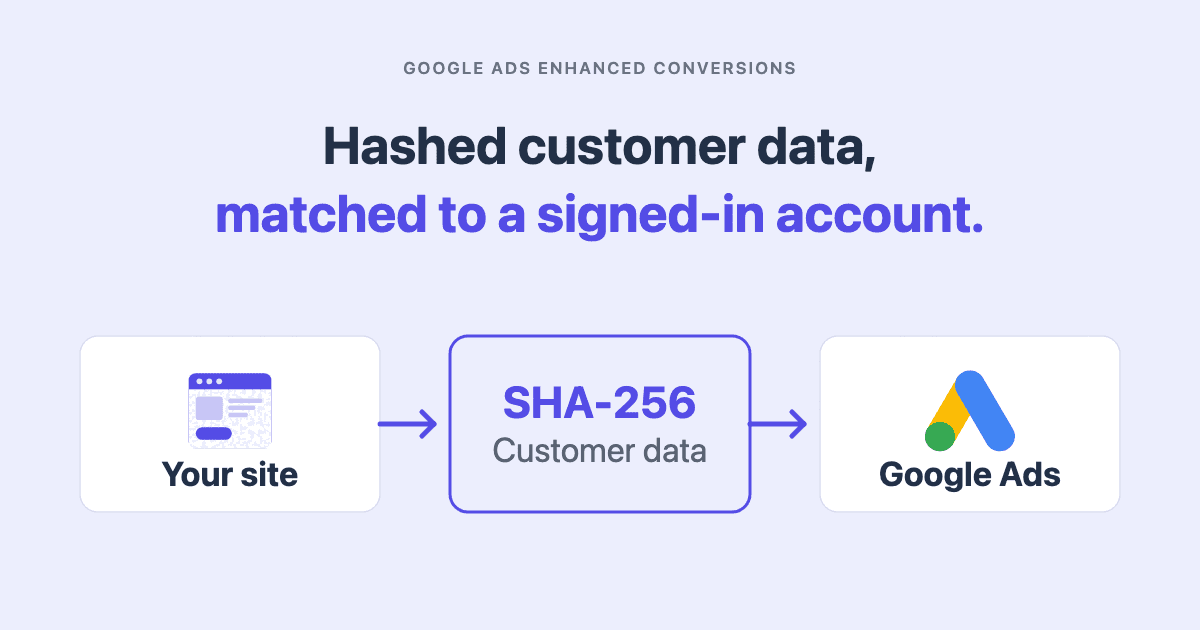
em | Email address | Normalize, then SHA-256 hash |
ph | Phone number with country code | Normalize, then SHA-256 hash |
fn, ln | First and last name | Normalize, then SHA-256 hash |
ct, st, zp, country | City, state, postal code, country | Normalize, then SHA-256 hash |
external_id | Stable advertiser-side identifier | TrueTracked hashes its visitor ID |
client_ip_address | Visitor IP address | Send unhashed |
client_user_agent | Browser user agent | Send unhashed |
fbc, fbp | Meta click and browser identifiers | Send unhashed |
Meta's customer-data SDK handles hashing separately from the browser-context fields. Hashing fbc or fbp changes the identifier Meta receives.
Use real values and omit unavailable fields. A placeholder email or your server's own IP address does not substitute for the visitor's information.
Normalize before hashing
Equivalent inputs must produce the same normalized value before hashing. For example, trim and lowercase an email address; format a phone number as digits with its country code.
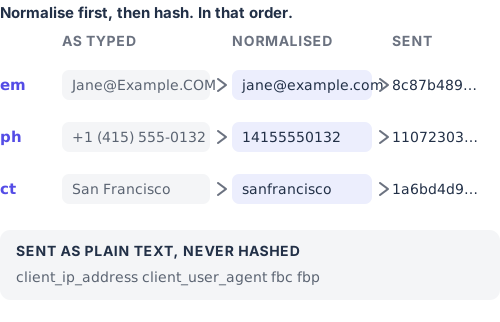
Matching depends on the value before hashing, so check normalization as well as the final digest.
The rules vary by field. Use Meta's customer information reference or maintained parameter helpers for names, addresses, and country codes.
Avoid hashing an already hashed value again. TrueTracked's payload builder distinguishes freshly supplied customer data from the pre-hashed fields retained for returning visitors.
Send a CAPI event from your server
For a direct integration, prepare the receiving dataset or pixel ID, an access token, and a server that can make HTTPS requests. Keep the token in server-side configuration.
Use the same receiving data source as the browser pixel when sending overlapping events. Pin a supported Graph API version and schedule its maintenance.
The endpoint is:
POST https://graph.facebook.com/v{VERSION}/{DATASET_ID}/events
Authorization: Bearer {ACCESS_TOKEN}
Content-Type: application/json
The JSON below illustrates a website purchase. It contains fictional identifiers and a fixed timestamp, so replace the example values before testing.
{
  "data": [
    {
      "event_name": "Purchase",
      "event_time": 1788912000,
      "event_id": "order_10482",
      "event_source_url": "https://example.com/thank-you",
      "action_source": "website",
      "user_data": {
        "em": ["8c87b489ce35cf2e2f39f80e282cb2e804932a56a213983eeeb428407d43b52d"],
        "ph": ["11072303eb5c8cb5c5a1ebb762f11b37b07131265b46fdfe1276196bfbd3ca51"],
        "client_ip_address": "203.0.113.42",
        "client_user_agent": "Mozilla/5.0 (example browser)",
        "fbp": "fb.1.1788652800000.1234567890",
        "fbc": "fb.1.1788652800000.EXAMPLE_FBCLID"
      },
      "custom_data": {
        "currency": "USD",
        "value": 149.00,
        "order_id": "10482"
      }
    }
  ],
  "test_event_code": "REPLACE_WITH_YOUR_TEST_EVENT_CODE"
}
The hashes correspond to [email protected] and 14155550132. The cookie timestamps use milliseconds; event_time uses seconds and records when the conversion occurred. Preserve real cookie values as captured instead of rewriting their timestamps when sending.
Meta's server-event reference implementation distinguishes the occurrence time, event identity, source, and customer information. Choose action_source for where the outcome happened; sending through a server does not make every outcome a website event.
Add the test event code at the request level, alongside data. Remove it after testing. Record responses and failures so an accepted request, rejected payload, and network timeout can be investigated separately.
For a direct integration, keep a delivery record containing the source event ID, occurrence time, delivery attempt status, and response. Retry temporary network or server failures with the same event ID. Investigate invalid payloads before resending them. Preserve the original conversion time rather than replacing it with the retry time, and alert on a growing delivery backlog.
Deduplicate overlapping Pixel and CAPI events
When the browser and server report the same conversion, coordinate the event name and identifier. Meta's deduplication guidance explains how the two deliveries are paired.
For the purchase above, the browser call would use:
fbq('track', 'Purchase', {
  value: 149.00,
  currency: 'USD'
}, { eventID: 'order_10482' });
The browser's eventID matches the server's event_id, and both use Purchase. Keep the ID stable across retries. A second legitimate purchase or booking needs its own ID.
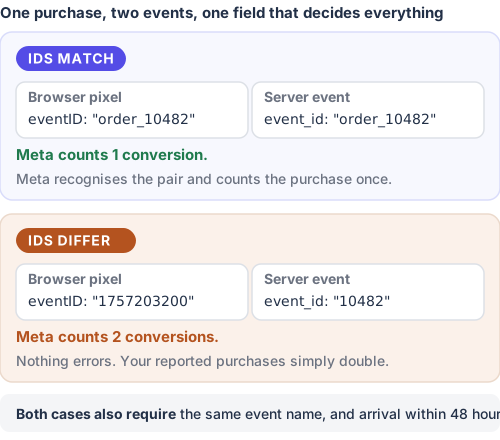
One field separates a correct integration from one that doubles its reported purchases.
Generate the ID once, where the conversion is first recorded, and carry it through both paths. A shared customer ID alone is insufficient because one customer can place more than one valid order.
This constructed example shows the arithmetic for 100 completed orders:
| Received events | Count |
|---|---|
| Browser events | 80 |
| Server events | 90 |
| Orders present in both sets | 70 |
| Distinct orders after successful deduplication: 80 + 90 − 70 | 100 |
| Raw deliveries before deduplication: 80 + 90 | 170 |
These are received-event counts, not a prediction of Ads Manager attribution.
Send events promptly. Meta's guidance is explicit: events are deduplicated only when they arrive within 48 hours of the first event carrying that ID. A nightly job running two days behind will not pair, however correct its IDs are.
TrueTracked shares event IDs across its browser and server paths and uses the transaction ID for purchases. Review existing pixel and CAPI senders during installation. Independent integrations need coordinated IDs or clearly separated responsibilities to avoid overlapping deliveries.
Verify delivery, matching, and attribution separately
A successful API response is the beginning of verification. Use a controlled test conversion, then check production coverage over a consistent period.
- Check receipt. Open Test Events, trigger the event, and confirm the expected server event appears. Inspect the name, value, currency, source, and timestamp. Check the response and Diagnostics for errors.
- Inspect identifier coverage. Confirm which customer fields and browser identifiers reached Meta. Test a returning visitor or delayed purchase as well as an immediate conversion. An
fbcvalue is expected only where relevant click context exists. - Review Event Match Quality. Use the score and parameter guidance to identify opportunities to improve customer information. An unchanged score does not prove nothing improved, and a high score does not establish delivery coverage.
- Check duplicate handling. For an overlapping event, inspect both sources and compare the event name and ID. Check Meta's deduplication reporting after processing; seeing two received deliveries alone does not establish double-counting.
- Reconcile like-for-like totals. Compare eligible backend conversions with delivered events using the same event definition, dates, timezone, and exclusions. Investigate missing or repeated event IDs before comparing ad-attributed revenue.
For example, compare successful purchase events with completed orders, rather than every add-to-cart. Exclude test events consistently. For purchases, agree whether values include shipping, taxes, cancellations, or refunds before interpreting a revenue gap.
Ads Manager reports conversions credited to ads under its attribution settings. Events Manager receives events from your data source. A business total can differ from either for legitimate reasons; ad platform ROAS explains that distinction.
| Symptom | Start by checking |
|---|---|
| Backend conversions have no corresponding server event | Source integration, event mapping, delivery responses, and retry handling |
| Received event volume jumps after installing another tool | Overlapping senders, event names, and shared IDs |
| Customer parameters are frequently missing | Collection, normalization, session links, and enrichment availability |
fbc is absent from every event | Whether Meta clicks were captured and retained through the conversion path |
| Events fail timestamp validation | Seconds versus milliseconds and the actual occurrence time |
| Match quality looks healthy but revenue differs | Event coverage, values, deduplication, and attribution scope |
How TrueTracked connects the steps
TrueTracked's Meta integration combines tracking, identity stitching, and TrueSignal delivery. Its value is the connection between the visit context and the eventual business record.
Keep available visit context
With Meta configured and a verified custom tracking domain, TrueTracked sets _fbp and _fbc through server response headers. It refreshes existing valid values on subsequent sync requests. When a new fbclid is observed, it can update the click cookie to reflect that visit.
The cookies request a 90-day lifetime. This is a configured expiry, not a guarantee against browser restrictions or deletion. The custom domain requirement applies to cookie sync; CAPI delivery can operate without it.
Enrich a later purchase
TrueTracked links incoming purchase records using available customer or session references. Its enrichment lookup retrieves stored browser context from linked sessions within a 30-day lookback, then fills available fields in the outgoing event.
That lets a purchase carry an earlier _fbc or _fbp even when the purchase webhook itself contains neither. The browser-cookie lifetime and the enrichment lookback are separate settings, serving different purposes.
Customer information comes from the order record where available. For returning visitors, the Meta payload builder also supports previously stored hashes of email, phone, and names. Missing data stays missing when there is no usable source or connection.
Send and check the event
TrueTracked normalizes and hashes the customer fields described above, preserves the unhashed browser identifiers, and pairs overlapping events through shared IDs. The event mapping controls which TrueTracked events are sent to Meta.
To configure it:
- Connect Meta through Facebook Login for Business, or use the manual Pixel ID and CAPI token option.
- Select the intended pixel and review Settings → TrueSignal → Configure events.
- Check your existing senders so another integration does not report the same events independently.
- Add a Test Event Code, trigger a supported conversion, and confirm the server event and its parameters in Events Manager.
The Meta integration guide covers this setup. For source-specific installation, use the pixel and conversion-source documentation.
Is the Conversions API worth it?
Better event coverage and usable identifiers give Meta more conversion information to work with. They can support matching and optimization, but they do not guarantee a particular ROAS increase.
Identity stitching depends on available records and the strength of their connections. It cannot retrieve a click identifier that was never captured. Recovering context also does not extend Meta's ad attribution window or make its reporting identical to TrueTracked's.
Collection and forwarding must respect applicable permissions and consent choices. The ICO's storage and access guidance explains obligations that depend on the use of data and technology. A server delivery path is not a consent exemption.
Use first-party tracking to understand the collection layer, then verify the connection from that layer to the conversion payload. A reliable send is useful. A reliable send carrying the right context is what this setup aims to achieve.
Sources
- Conversions API, Meta for Developers, for what the interface is and what it connects.
- Meta pixel, Shopify Help Center, for browser integrations carrying additional customer information.
- Introduction to server-side tagging, Google, for the relationship between incoming data, clients, and tags.
- CAPI parameter builder, Meta, for parameter collection and construction helpers.
- Customer-data SDK, Meta, for hashing and unhashed browser-context fields.
- Server-event SDK, Meta, for event time, identity, source, and payload fields.
- CAPI tag implementation, Meta, for request construction and test-event handling.
- Customer information parameters and deduplication guidance, Meta for Developers, for implementation reference.
- Storage and access technologies, ICO, for collection and storage obligations.
Technical examples and TrueTracked implementation details checked September 2026, using Meta's public SDK, tag implementation, and the product code.
Frequently asked questions
About the author

Founder of TrueTracked · Tracking, Attribution and Paid Ads Specialist
Seven years implementing conversion tracking and attribution for businesses running paid ads, most of it fixing measurement that was already broken.