In this article
- What are enhanced conversions in Google Ads?
- What changed in April 2026
- How to set up Google enhanced conversions
- Send the enhancement from your server
- Should I turn on enhanced conversions in Google Ads?
- Why might an advertiser use enhanced conversions for leads?
- How do I turn off enhanced conversions on Google Ads?
- How TrueTracked sends Google Ads conversions
- Where this leaves you
- Sources
You open the Goals icon in Google Ads, go to Settings, and expand the enhanced conversions section. There is one switch. The guide open in your other tab describes two, one for web and one for leads, and tells you to pick.
You are not seeing an early rollout and you have not lost a permission. Google's own documentation for its diagnostic extension states that "Enhanced conversions for web and leads are now combined into a single on/off setting". The same page adds that from April 2026, Google Ads "accepts user-provided data from website tags, Data Manager, and API connections".
So the question the setup used to open with, which flavour of enhanced conversions you are enabling, no longer exists. Three questions replace it, and this guide is those three in order. Where the customer data comes from, which fields you hash, and how you tell whether any of it worked.
What are enhanced conversions in Google Ads?
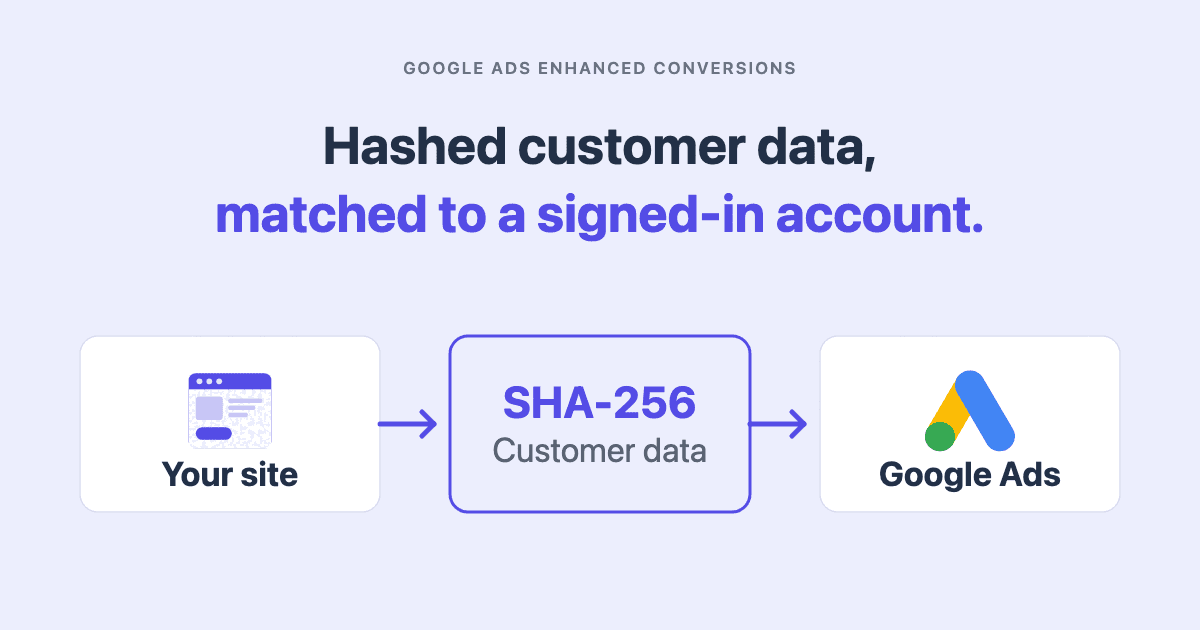
Enhanced conversions supplements a conversion your tag has already recorded with hashed customer data. That gives Google a second way to match the conversion to an ad click, one that does not depend on a cookie.
Google Ads Help describes it as using "hashed first party conversion data (from your website tags or your imported offline events)", including "email addresses, name, home address, and/or phone number". That data is "used to match your customers to Google accounts, which were signed-in to when they engaged with one of your ads". The hashing algorithm is SHA-256, applied after normalization: whitespace removed, letters lowercased, phone numbers formatted to E.164, and periods stripped from gmail addresses.
Two things follow, and both are commonly stated backwards.
It does not send your order value. The conversion tag already does. Google's server-side tagging reference is explicit that the Google Ads Conversion Tracking tag "automatically reads the following values from the corresponding ecommerce field: Transaction ID, conversion value, and currency code". Enhanced conversions adds identifiers to that, and nothing else. A guide describing it as pulling the order value off your confirmation page has described the conversion tag.
It does not create a second conversion. Google's API documentation has you "record conversions using a regular conversion tracking tag on your website" first, then send the hashed data afterwards. The enhancement attaches to the conversion already there.
What changed in April 2026
The single setting is the visible half. The half that matters for your build is that user-provided data now has three accepted sources rather than one.
| Where the data comes from | What it needs | When it fits |
|---|---|---|
| Website tag | The Google tag or a Tag Manager container, with user-provided data configured | The conversion and the customer data are in the same page. The checkout case |
| API connection | Google Ads API access and an order ID matching the tag's | The identifiers arrive after the page has closed |
| Data Manager | A connected data source in Google Ads | Data already reaching Google Ads that way |
The first two are the ones you implement yourself, and they are the rest of this guide.
How to set up Google enhanced conversions
Turn the setting on first. Data sent before it is on will not be processed.
- Open the Goals icon, then Settings.
- Expand the Enhanced conversions section.
- Check Turn on enhanced conversions.
- Review and agree to the customer data terms. Google states that by turning enhanced conversions on, "you confirm that you comply with Google's policies".
Then choose how the page supplies the data. Google documents three methods, in increasing order of control:
- Automatic. The tag "inspects the page for strings matching configured data types". Least work, and it depends on the values being in the rendered page.
- CSS selectors or JavaScript variables. You "manually specify CSS selectors or Javascript variables on your page that contain relevant user-provided data".
- A code snippet. You send the values directly. Google's note is that this "improves accuracy by consistently sending properly formatted data when the tag fires".
The Tag Manager guide covers the same three through a user-provided data variable. Nothing requires Tag Manager: the Google tag route offers the identical choice.
On the minimum, Google is specific. Email is preferred. An address is a match key only with first name, last name, postal code and country together. A phone can stand alone, and Google recommends sending it alongside an email.
Send the enhancement from your server
The API route earns its extra work in one situation: the identifiers are not available while the page is open. A payment confirmed minutes later arrives too late for the tag and in good time for this. Two constraints govern it, and missing either fails silently.
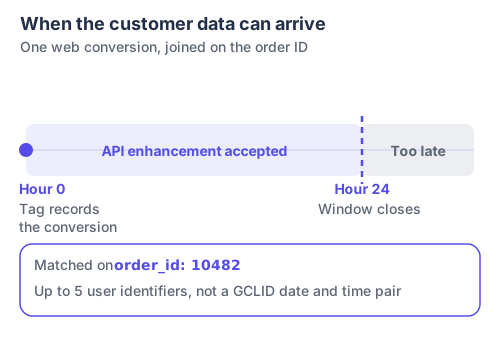
The order ID is not bookkeeping. It is the only thing joining the two halves, and an enhancement that carries a different one has nothing to attach to.
The first is the key. Google's API guidance states that "Enhancements MUST use order ID instead of GCLID date/time pair", and it must match what the tag sent. The second is the deadline of "up until 24 hours after the conversion".
The ConversionAdjustment below shows the fields that do the joining, not a complete request.
{
  "conversionAction": "customers/1234567890/conversionActions/987654321",
  "adjustmentType": "ENHANCEMENT",
  "orderId": "10482",
  "userIdentifiers": [
    { "hashedEmail": "8c87b489ce35cf2e2f39f80e282cb2e804932a56a213983eeeb428407d43b52d" },
    { "hashedPhoneNumber": "11072303eb5c8cb5c5a1ebb762f11b37b07131265b46fdfe1276196bfbd3ca51" }
  ]
}
userIdentifiers has two rules that catch people out. Each entry sets exactly one identifier type, so an email and a phone are two objects, not two keys in one. You may populate at most five.
Which fields you hash is not a judgement call, and it differs from the platform you probably built first.
| Field | Sent as | Note |
|---|---|---|
hashedEmail | SHA-256 hash | Normalize first: trim, lowercase, strip periods from gmail addresses |
hashedPhoneNumber | SHA-256 hash | E.164 format, with the country code, before hashing |
| First name, last name | SHA-256 hash | Inside addressInfo |
| Street address | SHA-256 hash | Inside addressInfo |
| Country, state, city, postal code | Unhashed | Google's API guidance is explicit that these are not hashed |
Check that last row if you ported a payload builder from elsewhere. Meta hashes city, state and country. Google does not want them hashed here, and the failure is quiet: a hash in a field expecting clear text is still a valid string.
On duplicates, the rule is short. An enhancement supplements rather than adds, so it does not double count by itself. Sending the same conversion down two paths does. Google's instruction is to use the transaction ID function in your tag "so Google is able to match your tag conversions with your API conversions to avoid duplication". The Meta Conversions API guide covers how shared-ID deduplication works, and how it fails.
Should I turn on enhanced conversions in Google Ads?
Turn it on where the conversion payload already carries an email or a phone number. Then read the number that decides everything else.
Google's tag diagnostics report gives three metrics answering different questions. Coverage is "the percentage of your eligible conversion events with sufficient user provided data". Match rate is "how well your user provided data matches with Google signed-in data". Conversion uplift is the "increased conversions reported from your user provided data".
Coverage is the one you control from your own site. The month below is a composite. The amounts are constructed. The arithmetic is the point.
| Composite month | Conversions |
|---|---|
| Purchase conversions recorded by the tag | 1,000 |
| Payloads carrying a hashed email | 690 |
| Payloads carrying a hashed phone but no email | 90 |
| Conversions with at least one match key: 690 + 90 | 780 |
| Coverage: 780 / 1,000 | 78% |
| Conversions no enhancement can reach: 1,000 − 780 | 220 |
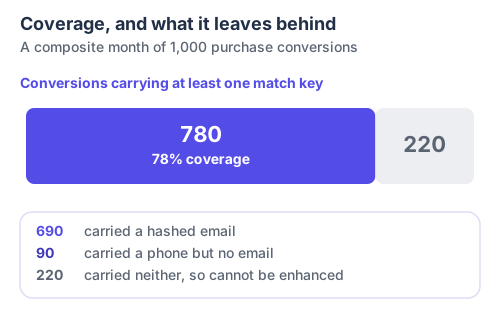
Those 220 are not badly matched. They are unreachable, and nothing you change inside Google Ads moves them. The fix is upstream, in what the page collects.
Note what the table does not do. It does not derive uplift from coverage and match rate, because Google does not document that relationship. Uplift is reported to you. The other two are diagnosed.
| What enhanced conversions answers well | What not to use it for |
|---|---|
| Whether a recorded conversion can be tied to an ad click through an identifier rather than a cookie | Counting how many conversions your business actually had |
| Whether your pages supply an identifier at all, through the coverage figure | Comparing revenue across ad platforms, which each measure a different window |
| Whether a conversion action is set up correctly, through the diagnostics status | Proving a change in ad performance on its own |
Reconcile against your own backend for a closed period, not against Ads Manager. Why your ad platform ROAS is wrong explains why those two numbers are not supposed to agree.
Why might an advertiser use enhanced conversions for leads?
Because a form submission on your own site is a conversion action like any other. A website Lead action carries hashed customer data exactly as a Purchase action does. The email someone just typed into your form is usually the strongest identifier you will ever have for them.
The old split treated that as a separate feature to enable. It is now the same switch, so everything above applies unchanged. The same fields hash, the same order ID joins an API enhancement, and the same coverage figure tells you how many Lead conversions carried an identifier at all.
How do I turn off enhanced conversions on Google Ads?
The same switch. Open the Goals icon, go to Settings, expand the enhanced conversions section and clear the checkbox.
One consequence of the consolidation is worth knowing first. Because web and leads are now a single setting, clearing it stops both rather than the one you had in mind. Conversion data already reported stays as it is.
How TrueTracked sends Google Ads conversions
TrueTracked does not build or hash the Google Ads payload itself. Google Ads conversions ride a server-side container, and the hashing is done by Google's own tag in both of the paths below.
Four standard ecommerce conversions travel server-side: product viewed, add to cart, checkout started and checkout completed. The browser event passes through TrueTracked's collection endpoint, which injects the conversion ID and label into the hit. The container's Google Ads Conversion tag reads those and fires.
Conversions attached to a merchant's own custom events fire from the browser instead, through gtag. Where that event carries an email or a phone number, TrueTracked passes the plain values into gtag('set', 'user_data', ...). Google's tag normalizes and hashes them client-side. The transaction ID rides along when the event has one.
The two paths are mutually exclusive by design. One module is the source of truth for the split, precisely so an event cannot reach Google Ads twice and be counted twice.
Two limits worth stating plainly. Enhanced conversions still has to be turned on for the conversion action in Google Ads, and no delivery path substitutes for that switch. And an event carrying neither identifier still fires the conversion, just without the extra match signal. The Google Ads integration shows the setup, TrueSignal covers the server-side delivery, and first-party tracking covers the collection layer underneath.
Where this leaves you
Enhanced conversions is a small feature with one switch and a short list of fields. The setup is genuinely an afternoon. What decides whether it is worth anything is not in Google Ads at all.
Four things decide it, in the order they usually go wrong.
- Whether the conversion page has an email or a phone number to give, which sets your coverage ceiling.
- Whether the fields Google wants hashed are hashed, and the four it wants in clear are not.
- Whether an API enhancement carries the same order ID the tag sent, inside 24 hours.
- Whether the same conversion is reaching Google Ads down more than one path.
Check coverage first. It is the only one you cannot fix from inside the ad account, and it caps the other three. If you are weighing this against moving the whole conversion server-side, server-side tracking sets out what that changes and what it does not.
Sources
- About enhanced conversions, Google Ads Help, for the data it sends, the SHA-256 hashing and the normalization rules
- Set up enhanced conversions using the Google tag, Google Ads Help, for the menu path, the three collection methods and the customer data terms
- Set up enhanced conversions with Tag Manager, Google Ads Help, for the user-provided data variable and the minimum fields
- Enhanced conversions for web in the Google Ads API, Google Ads Help, for the 24 hour window and the transaction ID requirement
- Enhanced conversions for web, Google Ads API, for the order ID rule, the five identifier limit and the hashed fields
- Enhanced conversions for web tag diagnostics, Google Ads Help, for the definitions of coverage, match rate and conversion uplift
- The enhanced conversions assist tool, Google Ads Help, for the April 2026 change and the combined setting
- Google Ads conversions, Tag Manager server-side, for the values the conversion tag reads automatically
- Google Ads User-provided Data Event, Tag Manager server-side, for the container's collection methods
All nine sources checked September 2026, and the TrueTracked details against the product code.
Frequently asked questions
About the author

Founder of TrueTracked · Tracking, Attribution and Paid Ads Specialist
Seven years implementing conversion tracking and attribution for businesses running paid ads, most of it fixing measurement that was already broken.