In this article
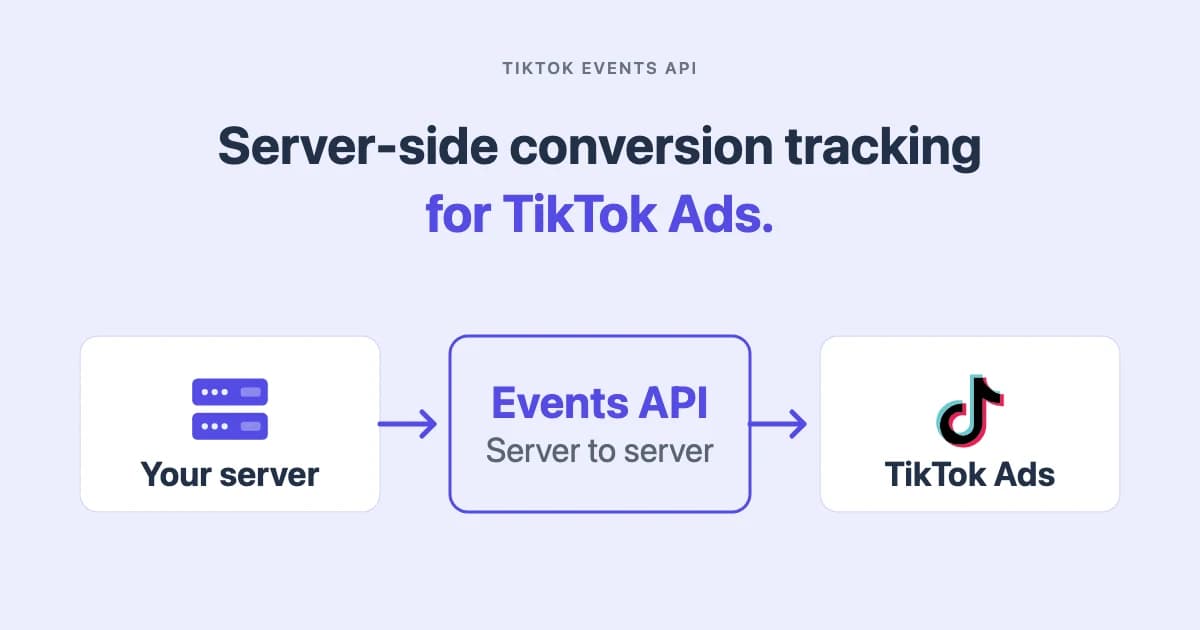
The TikTok Events API, which you will also see called the TikTok Conversions API, sends conversion events from your server to TikTok Ads. You have it sending, the response is a 200, and your match rate is still disappointing. So you do the obvious thing and extend how long you store the click ID, on the reasoning that a longer-lived identifier gives TikTok more chances to match.
Check TikTok's parameter documentation before you build that. On the ttclid field it states, in one line, that the ttclid valid period is the same as your CTA window setting in Attribution Manager. The click ID has no lifetime of its own. It inherits one from a setting in your ad account.
That is not a small detail. It means a decision made once, in Attribution Manager, quietly governs the useful life of the strongest matching signal you have. Most implementation guides tell you to capture ttclid and store it. Almost none tell you what it is worth after that.
How long does ttclid last?
Exactly as long as your click-through attribution window, and no longer.
Which window, though, depends on where you look, and TikTok's own help pages give two different option sets. At the ad group level, TikTok's setup instructions say to "Select 1 day, 7 day, 14 day, 28 day" for click-through. Its Attribution Manager page lists a narrower set: "CTA: 1 day or 7 day, EVTA: 1 day or 7 day, VTA: off or 1 day".
Both are TikTok's own documentation, and they describe different surfaces. Check the setting on the ad group you are actually running before assuming either.
| What you set | Where you set it | What it means for a stored click ID |
|---|---|---|
| CTA 1 day | Ad group, or Attribution Manager | A click ID captured yesterday is already outside the window |
| CTA 7 day | Ad group, or Attribution Manager | The common choice, and the shorter of the two documented ceilings |
| CTA 14 or 28 day | Ad group level only | The longest documented click window, and not offered everywhere |
| VTA off, 1 or 7 day | Ad group, or Attribution Manager | Not click-based, so the click ID plays no part in it |
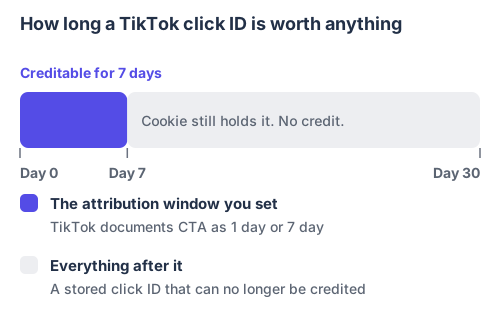
Storing the identifier longer than the window does not extend the window. It only makes the cookie outlive its usefulness.
The practical rule: capture ttclid on the landing page, on the first request, and get the conversion sent inside the window you actually set. Storing it beyond that window is harmless, and it is not a substitute for sending promptly. Where the sales cycle runs past the window on the ad group in question, the click ID is not the identifier that will save you, and hashed email is.
Get the two credentials
Everything below assumes web events. TikTok's Events API also covers app and offline sources, which behave differently and are outside this guide.
You need two values from Events Manager in TikTok Ads Manager: an event source ID, which identifies the data source receiving events, and an access token. Generate the token from the Events API section of the data source and keep it in server-side configuration, never in client code.
TikTok's own overview describes the interface as providing "advertisers with a reliable connection between TikTok and advertiser's marketing data". It also recommends running it alongside the pixel: "We recommend having an Events API integration with your existing Pixel integration to maximize performance benefits."
That recommendation is the reason deduplication matters, and it is where most implementations go wrong.
Send a web event
Events go to the /event/track/ endpoint of the Business API, authenticated with the access token as a request header. The event below is a purchase.
{
  "event_source": "web",
  "event_source_id": "YOUR_EVENT_SOURCE_ID",
  "data": [
    {
      "event": "Purchase",
      "event_time": 1788912000,
      "event_id": "order_10482",
      "user": {
        "ttclid": "EXAMPLE_TTCLID_FROM_LANDING_PAGE",
        "ttp": "EXAMPLE_TTP_COOKIE_VALUE",
        "email": "848a771458438fc2ec420560d769fb9b9b86851ee338ec56517baabd79d3bb4f",
        "phone": "9f7ec22d72092cd3c0b58726ed9c2d91b92e51a3f29837508fb2948b1e2e0e5f",
        "ip": "203.0.113.42",
        "user_agent": "Mozilla/5.0 (example browser)"
      },
      "page": {
        "url": "https://example.com/thank-you"
      },
      "properties": {
        "currency": "USD",
        "value": 149.00,
        "order_id": "10482",
        "contents": [
          { "content_id": "SKU-114", "content_type": "product", "quantity": 1, "price": 149.00 }
        ]
      }
    }
  ]
}
Two things in that payload are easy to get wrong.
event_time is a Unix timestamp in seconds, in UTC. Milliseconds fail validation, and a retry must carry the original conversion time rather than the time of the retry.
The event name is case-sensitive. TikTok's supported events documentation is explicit that the names are case-sensitive and that you must use the exact name shown in its Event column. purchase is not Purchase, and a name that does not match a standard event is not usable for optimization.
Hash the right fields, and only those
This is the single most common cause of a rejected payload, and TikTok names it directly in its error documentation.
| Field | Sent as | TikTok's normalization rule |
|---|---|---|
email | SHA-256 hash | Trim leading and trailing spaces, lowercase, then hash |
phone | SHA-256 hash | Normalize to E.164 with the country code and a leading +, then hash |
external_id | SHA-256 hash | Your own stable customer or visitor identifier |
first_name, last_name, zip_code | SHA-256 hash | Normalized, then hashed |
ttclid, ttp | Unhashed | The click identifier and browser identifier, exactly as captured |
ip, user_agent | Unhashed | Browser context, sent as observed |
city, state, country | Unhashed | A real difference from Meta, which hashes these |
That last row is worth pausing on if you built your Meta integration first. Meta hashes city, state and country. TikTok does not. Porting a Meta payload builder across without changing that produces hashed values in fields TikTok expects in clear, and the matching quietly gets worse rather than failing loudly.
Normalization matters as much as the hash. TikTok's parameter documentation gives a worked example: " [email protected] " normalizes to [email protected] before hashing. Two systems that trim and lowercase differently produce two different digests for one customer.
Deduplicate on three fields, not two
The mechanism is the same as every other platform: send a shared ID from the browser and the server, and the platform pairs them instead of counting twice. The Meta Conversions API guide covers how that works and how it fails.
TikTok's difference is the number of keys. Its parameter documentation states that it "uses the event_source_id, event_id and event to deduplicate the same event sent multiple times from a single channel or across multiple channels". Three fields, all of which must agree.
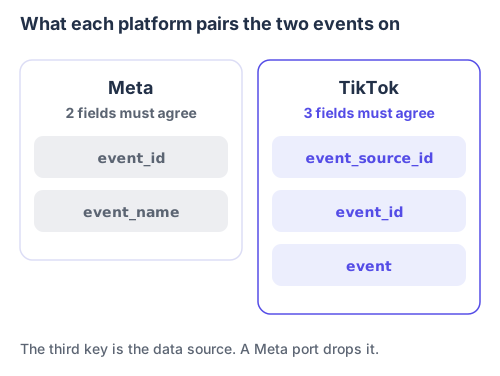
The extra key is the data source. Sending server events to a different data source than the pixel breaks pairing even when the IDs match perfectly.
Two practical consequences. event_id is conditional rather than optional, and TikTok requires it whenever web events come from both the pixel and the Events API, which is the setup TikTok recommends. And a payload builder ported from Meta carries the two familiar keys across and silently drops the third.
Verify it worked, properly
A 200 is where verification starts, not where it ends. TikTok returns a response code inside the body, and you have to read it.
For a successful call, TikTok documents that "the API will return a response with 200 HTTP Status Code" and "the response body will contain an API response code of 0". For a failure, "if the request fails, you will get a 4XX or 5XX HTTP Status Code", with a message explaining the details.
| Return code | HTTP status | What TikTok documents as the cause |
|---|---|---|
| 0 | 200 | Request succeeded |
| 40001 | 400 | No permission for the advertiser account |
| 40002 | 400 | Invalid payload: bad JSON, a missing or wrong-typed field, an unhashed value in a field requiring SHA-256, or more than 1000 events in one request |
| 40100 | 401 | Rate limit reached. The documented endpoint limit is 1,000 queries per second |
| 40104 | 401 | Access token is empty |
One detail saves a great deal of time when you batch. If several events go in one call, the message names the zero-based index of the first invalid event, as in Invalid value for data.2.event_id. That points at the third event in the array, not the whole batch, so read the index before you start auditing every event you sent.
Then check the numbers rather than the plumbing. Count purchases in your own back end for a closed week, compare against events received in Events Manager for the same period, and treat any gap as a delivery question. What TikTok then attributes in Ads Manager is a different measurement with its own window. Why your ad platform ROAS is wrong explains why those two numbers are not supposed to match.
The mechanism here is identical for a lead generation, SaaS or service business. The conversion object changes from an order to a booked call or a trial, and nothing else in this guide does.
How TrueTracked sends TikTok events
TrueTracked sends TikTok conversions through the Events API as part of its server-side delivery, rather than as a separate integration you configure and maintain.
Click identifiers are captured on arrival, ttclid among them, and stored against the session, so a conversion recorded later carries the click context the order record never held. Customer fields are normalized and hashed to TikTok's rules, and the identifiers TikTok expects in clear are left unhashed. The event carries the same event ID as the browser event, using the transaction ID for purchases, so the pixel and server events pair rather than double-count.
The limit worth stating plainly: none of this recovers a click ID that was never captured, and no configuration extends the attribution window that governs it. The TikTok integration is the page that shows the setup, and first-party tracking covers the collection layer the capture depends on.
Where this leaves you
The TikTok Events API is not difficult to send to. The endpoint is simple, the payload is small, and a working request is an afternoon of work.
What decides whether it is worth anything is narrower. Four things, in order of how often they are wrong:
- Whether the click ID was captured on the landing page, on the first request.
- Whether the fields TikTok wants hashed are hashed, and the ones it wants in clear are not.
- Whether all three deduplication keys agree with what your pixel sends.
- Whether the conversion arrives inside the attribution window you set.
Check that window first. It is the cheapest of the four to get wrong and the least visible when you do.
Sources
- Events API parameters, TikTok API for Business, for the ttclid valid period, the SHA-256 normalization rules for email and phone, and the three-field deduplication statement
- Events API responses and errors, TikTok API for Business, for the response code contract and the documented causes of 40001, 40002, 40100 and 40104
- Events API supported events, TikTok API for Business, for the standard web event names and the case-sensitivity rule
- About Events API, TikTok for Business Help Center, for what the interface connects and the recommendation to run it alongside the pixel
- About the attribution window on TikTok Ads Manager, TikTok for Business Help Center, for the Attribution Manager window options
- How to create attribution windows for your ad group, TikTok Ads Manager Help, for the 1, 7, 14 and 28 day click-through options at ad group level
- Handling duplicate pixel and Conversions API events, Meta for Developers, for the two-field comparison
- Customer information parameters, Meta for Developers, for the fields Meta hashes that TikTok does not
- Full third-party cookie blocking and more, WebKit, for the browser cookie lifetime limits that make prompt capture matter
All nine sources checked September 2026.
Frequently asked questions
About the author

Founder of TrueTracked · Tracking, Attribution and Paid Ads Specialist
Seven years implementing conversion tracking and attribution for businesses running paid ads, most of it fixing measurement that was already broken.